WhatsApp to Tally is live today, not a waitlist. Free for 14 days.

The GST mistakes your accountant catches. Caught first.

Before a bill can be approved, TaskAutomate checks that it is raised on your GSTIN, that the tax split is right for where the supplier is, and that the numbers add up. A bill that fails waits for you instead of going into your books.
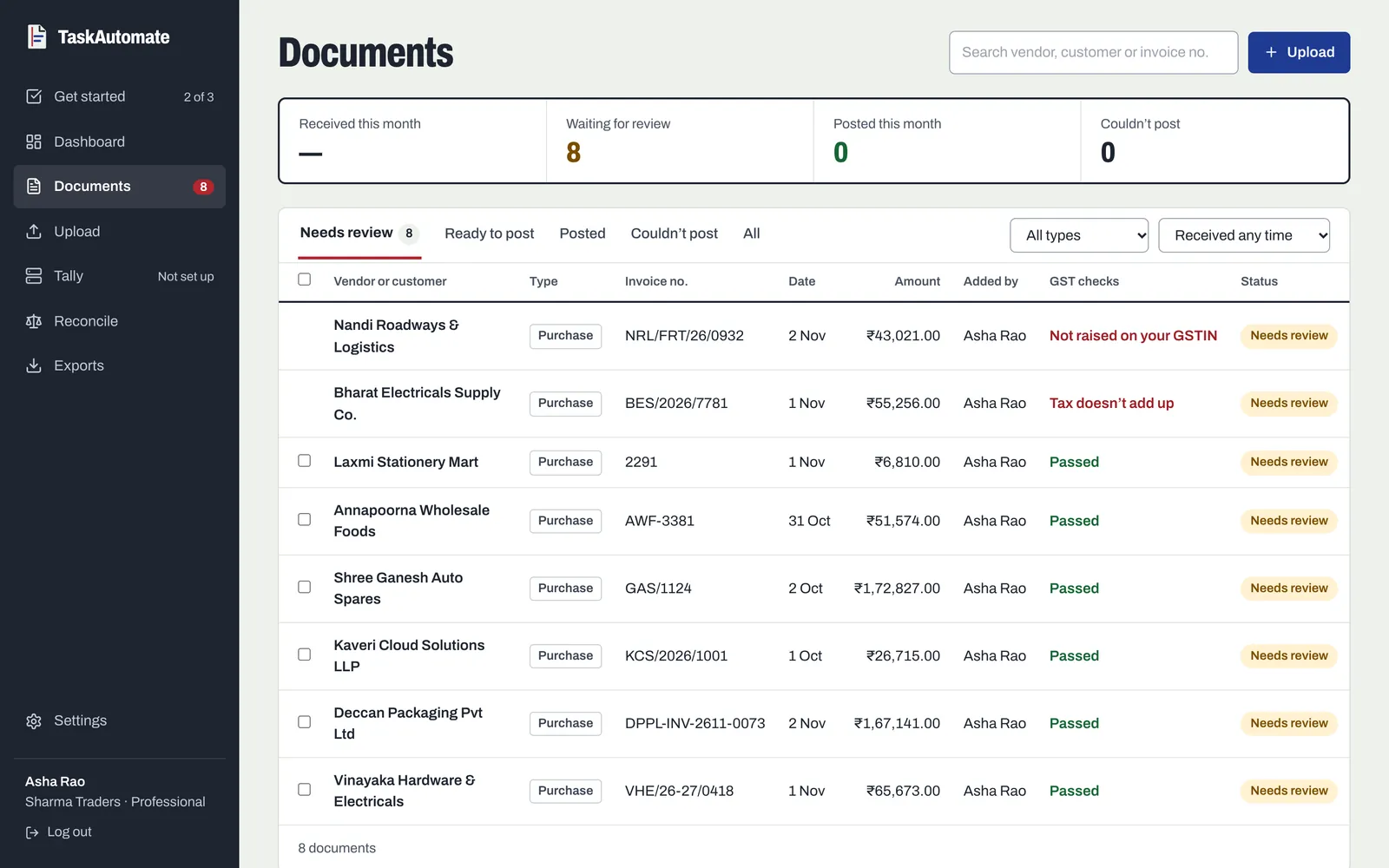
TaskAutomate documents list with a GST checks column: six purchase bills passed, one flagged "Not raised on your GSTIN" and one flagged "Tax doesn’t add up", all waiting for review
Every bill gets its GST checks before review. Two of these demo bills were caught: one raised on the wrong GSTIN, one whose tax doesn’t add up.

Seven checks on every bill

Whose bill it is

Read from the GSTINs printed on the bill.

  1. The bill is raised on you

    The buyer GSTIN on the bill must match the GSTIN registered in your settings. A bill made out to another company or branch is caught.

  2. The buyer GSTIN is real

    A GSTIN missing from the bill, or one that fails the format and check-digit test, is flagged as missing rather than passed.

Whether the tax is right

Run on the CGST, SGST and IGST read from the bill.

  1. CGST and SGST, or IGST. Never both.

    A bill carrying both is a misprint or a misread, and is flagged.

  2. CGST equals SGST

    The two halves must match in amount and rate.

  3. Right tax for where the supplier is

    Same state as you: CGST and SGST. Another state: IGST.

  4. The totals add up

    Subtotal plus every tax line must equal the bill total.

  5. Every rate is a GST slab

    0, 0.1, 0.25, 3, 5, 12, 18 or 28 percent. A 15% line means something was read wrong.

Warn, or hold

Turn each group of checks on in Settings, and pick what a failure does.

Warn keeps the bill moving with a warning on it, for teams that review every bill anyway.

Hold sets the bill aside until someone looks at it, so a wrong bill doesn’t slip through in the month-end rush.

The rest of the flow

Each part does one job. Together they take a bill from a phone to a posted voucher.

Guides

GST check questions

What happens when a bill fails a check?

You choose, per check. In warn mode the bill carries a warning you see before approving. In hold mode it is marked as an error and set aside, so someone has to look at it before it moves on.

Does it look the GSTIN up on the GST portal?

No. It checks that the buyer GSTIN on the bill is a well-formed GSTIN and that it is yours. It does not query the GST portal for the supplier’s registration status.

How does it know whether a bill should have IGST?

From the first two digits of the supplier’s GSTIN, which are the state code. If the supplier is in your state, the bill should carry CGST and SGST; if not, IGST.

Will rounding on the bill set off a warning?

No. Amounts are compared within ₹1 and rates within 0.01%, so normal rounding passes. A misread digit or a missing tax line does not.

What about bills with no GST breakdown, like a composition dealer’s bill?

If a bill shows no CGST, SGST or IGST split, the tax checks are skipped for it rather than failed. The buyer GSTIN check still runs if the bill carries one.

We have GST registrations in more than one state. Does that work?

Yes, on the Enterprise plan. Add every registered GSTIN and a bill passes if it is raised on any of them. Enterprise also adds TDS deduction rules by expense type.

Keep wrong bills out of your books.

GST checks are on every paid plan. Try them free for 14 days, up to 100 bills.